

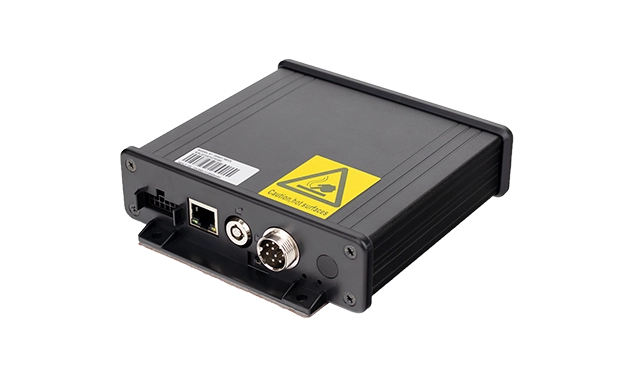
HH420 / HH421 Camera Hub for Vehicle Video
External camera hub that connects up to four AHD or analog cameras to a TOPICON rugged tablet through a compatible cradle. The hub handles camera input and video encoding, then outputs RTSP streams over Ethernet to the tablet. The tablet runs the display application and remains the user interface — the hub works in the background. HH420 has no local storage; HH421 adds an internal hard disk for continuous recording.
Key Capabilities
4× AHD / analog camera input (all cameras must be same type)
Supports 960×576 analog, AHD 720p, AHD 1080p
RTSP stream output via RJ45 Ethernet
DC 12–36V vehicle power input
HH421 adds internal HDD for continuous recording
Trigger input for automatic video pop-up
Overlay display for date, time, camera name, vehicle ID
HH420 vs HH421
| Feature | HH420 | HH421 |
|---|---|---|
| Camera Input | 4× AHD / analog | 4× AHD / analog |
| RTSP Output | ✓ | ✓ |
| Local Recording | ✕ | ✓ Internal HDD |
| Recording Capacity | — | 512GB / 1TB / 2TB HDD options |
| Power Input | DC 12–36V | DC 12–36V |
Deployment Architecture
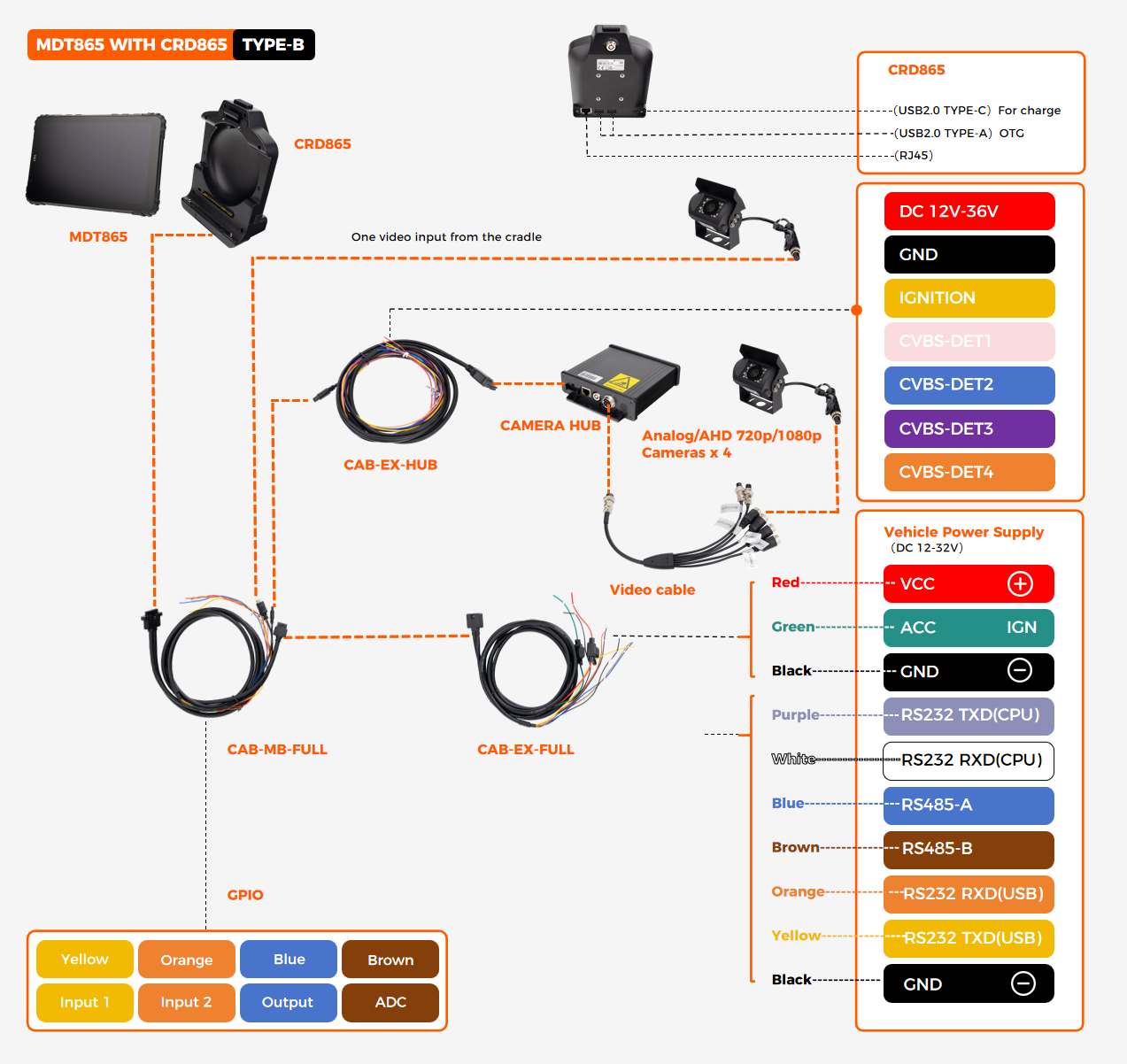
The Camera Hub sits between the vehicle cameras and the tablet cradle. Cameras connect directly to the hub. The hub encodes the video and outputs an RTSP stream over Ethernet. The tablet connects to the hub through the cradle and runs the display application. Power is shared with the vehicle 12–36V supply.
Compatible Cradles
The Camera Hub works with the following TOPICON cradles:
The hub connects to the cradle via a dedicated cable. The tablet docks into the cradle as usual. All camera and power connections are made at the hub, not at the tablet.
Software & Configuration Overview
The Camera Hub is configured and managed through Android applications on the tablet. No separate PC software is required. The tablet communicates with the hub through the cradle connection.
Live View & Trigger Pop-up
Install the live video application on the tablet. When a trigger signal is received — turn signal, reverse gear, or door switch — the live video window pops up automatically. When the trigger is released, the window closes and the tablet returns to the previous application.
RTSP Video Output
The hub outputs standard RTSP streams over its RJ45 Ethernet port. The default address is rtsp://192.168.1.10:6880/1~4 for 1080p channels and /5~8 for 720p channels. Any RTSP-compatible player — including VLC on a PC — can view the stream.
Recording & Playback (HH421)
On HH421, video is recorded continuously to the internal HDD in a loop. Recorded files can be requested, previewed, and played back through the Request Video application on the tablet, or through the TOPICON video management server at vm.topicon.hk.
Overlay & Time Zone
Text overlay — date, time, camera name, vehicle ID — is configured through an overlay.txt file. Time zone adjustment is supported. The overlay appears on both the tablet display and the RTSP stream.
Firmware Upgrade
Firmware and uboot updates are pushed from the tablet through the cradle connection. The upgrade application displays a progress bar on the tablet screen. No physical access to the hub is required.
Network Configuration
The hub's IP address is set through the tablet dialer interface. The default is 192.168.1.210. It can be changed to match the local network for integration with a PC or NVR.
HH421 Recording Capacity
Recording time depends on HDD size and camera resolution. The table below shows approximate continuous recording duration for a single channel. The hub records all connected channels simultaneously, so total capacity is shared across channels.
| HDD Size | 720p | 960p | 1080p |
|---|---|---|---|
| 512 GB | 3 days | 9 days | 2.2 days |
| 1 TB | 6 days | 18 days | 4.5 days |
| 2 TB | 12 days | 36 days | 9 days |
Recording duration is approximate and depends on scene complexity and motion. The hub uses loop recording — oldest files are overwritten when the disk is full.
Typical Applications
Bus & Transit
Passenger surveillance, driver monitoring, and door-side cameras with local recording for incident review.
Truck & Fleet
Blind-spot and rear-view cameras with event recording. Ideal for fleets that need video evidence but not a full MDVR.
Heavy Equipment
360° surround view and rear-view for excavators, loaders, and cranes. HH421 records for later analysis.
School Bus Safety
Interior surveillance, driver monitoring, and student tracking with recorded video for compliance.