
Vehicle Tablet Docking Station Matrix – Pre-Configured Cradle Options Across MDT880, MDT865 & MDT1065
Find the exact docking station for your fleet in one view. This matrix covers every pre-configured cradle variant for TOPICON Vehicle Mount Computer platforms — with CAN Bus tablet interfaces, RS232/RS485, GPIO, AHD, M12, and Gigabit. No more scrolling through individual product pages.
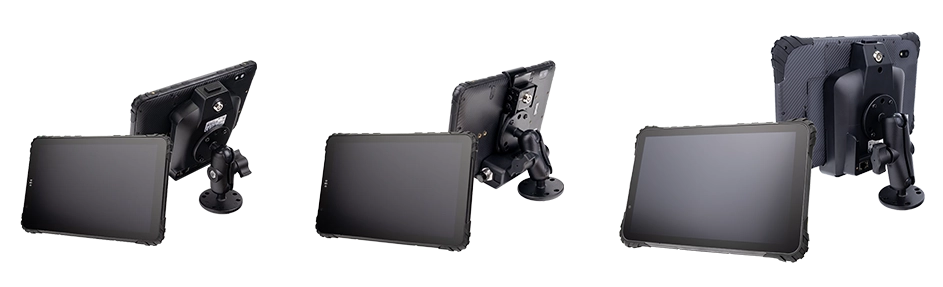
⏳ Note: Cradle models, interfaces and cable configurations may be updated as products evolve. For the most current information and selection advice, contact the TOPICON engineering team directly.
Three Dock Tiers for Every Fleet Environment
One tablet platform. Three dock categories — from standard quick-release to all-metal heavy-duty to integrated barcode scanning. System integrators deploy the same MDT865 or MDT880 tablet across multiple vehicle types by changing the dock, not the device. Explore the vehicle-mounted tablets that pair with these dock tiers.
Quick-Release Dock
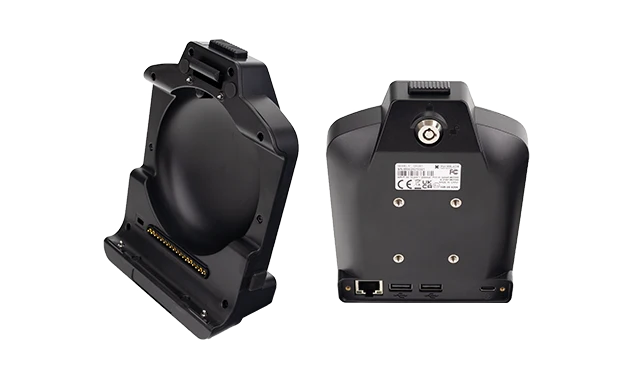
RAM-mount bolt-on base. One-hand dock and undock in 1 second. Pogo-pin contacts, 10,000+ mating cycles.
Light Trucks
Field Service
All-Metal Fixed Dock
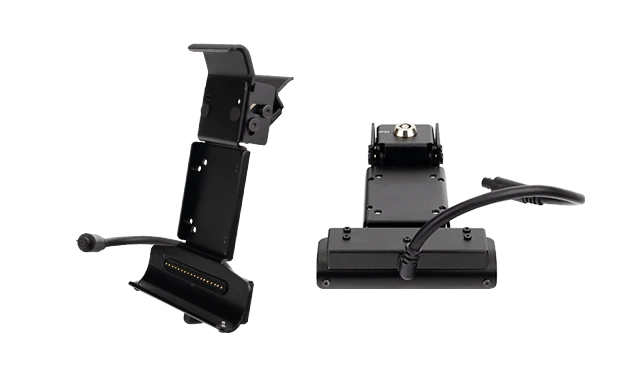
BKT865 · BKT1065 Variants
IP67-rated version available
RAM-mount bolt-on base. Full aluminum alloy. Key-lock retention for fixed installation. IP67 waterproof connector config available.
Agricultural Tractors
Heavy Construction
Integrated 1D/2D Barcode Scanner Dock
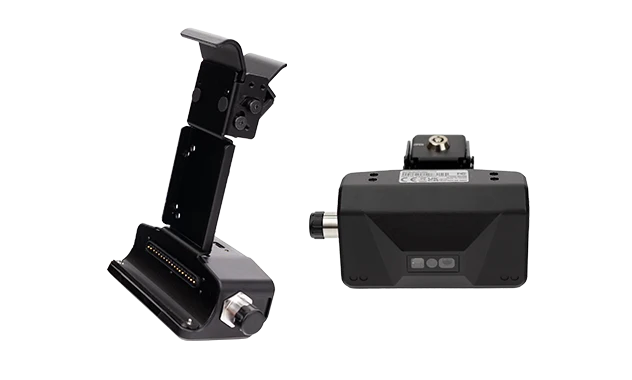
RAM-mount bolt-on base. All-metal extended dock with built-in barcode imager. USB-C powered. Hands-free auto-scan or handheld mode.
Waste Management
Yard Logistics
→ All three dock tiers share the same tablet interface — same MDT865, MDT880, or MDT1065, same Android OS, same MDM. Refer to the cradle-by-cradle configuration matrix below for detailed interface specifications.
MDT880 Docking Stations
8" 5G Fleet Tablet · 17 cradle configurations across CRD880, CRD865-BAS, and BKT865 series
⚡ Same cradle hardware, different cable kits — select the interface set that matches your deployment.
USB ports: All USB-A ports on the cradle provide OTG host functionality. All USB-C ports provide charging only. When the tablet is docked, the tablet's own side USB ports are blocked and cannot be used — all USB connectivity is provided through the cradle cable.
GPIO allocation: In / Out / ADC breakdown per cradle. Example: "4× (2 / 1 / 1)" means 4 total GPIO lines — 2 inputs, 1 output, 1 ADC input.
RS485: Marked with * is provided through the configurable RS232/RS485 USB channel (software-selectable mode).
CAN Bus: CRD880-CAN and CRD880-FULL support 2× CAN Bus channels natively. Any cradle configuration with a USB-A OTG port can add up to 2 CAN Bus channels through the optional EXT-USB-CAN-01 — USB to CAN Bus Adapter Cable, enabling CAN Bus integration on configurations that do not include a native CAN interface.
Shared platforms: CRD865-BAS and BKT865 series are shared with the MDT865 platform. See the MDT865 docking station table for platform-specific interface differences.
BKT865 series: Key-lock retention, designed for fixed permanent installation.
Cable dependency: Interface availability depends on the selected cable kit. The same physical cradle can expose different interfaces through different CAB-xxx cables.
MDT865 Docking Stations
8" 4G Rugged Tablet · 13 cradle configurations across CRD865, CRD865-BAS, and BKT865 series
⚡ Same cradle hardware, different cable kits — select the interface set that matches your deployment.
USB ports: All USB-A ports on the cradle provide OTG host functionality. All USB-C ports provide charging only. When the tablet is docked, the tablet's own side USB ports are blocked and cannot be used — all USB connectivity is provided through the cradle cable.
GPIO allocation: In / Out / ADC breakdown per cradle. Example: "4× (2 / 1 / 1)" means 4 total GPIO lines — 2 inputs, 1 output, 1 ADC input.
CAN Bus: CRD865-CAN supports 1× native CAN Bus channel. Any cradle configuration with a USB-A OTG port can add up to 2 CAN Bus channels through the optional EXT-USB-CAN-01 — USB to CAN Bus Adapter Cable, enabling CAN Bus integration on configurations that do not include a native CAN interface.
Shared platforms: CRD865-BAS and BKT865 series are shared with the MDT880 platform. See the MDT880 docking station table for platform-specific interface differences.
BKT865 series: Key-lock retention, designed for fixed permanent installation.
Cable dependency: Interface availability depends on the selected cable kit. The same physical cradle can expose different interfaces through different CAB-xxx cables.
MDT1065 Docking Stations
10" 4G Rugged Tablet · 13 cradle configurations across CRD1065, CRD1065-BAS, and BKT1065 series
⚡ Same cradle hardware, different cable kits — select the interface set that matches your deployment.
USB ports: All USB-A ports on the cradle provide OTG host functionality. All USB-C ports provide charging only. When the tablet is docked, the tablet's own side USB ports are blocked and cannot be used — all USB connectivity is provided through the cradle cable.
GPIO allocation: In / Out / ADC breakdown per cradle. Example: "4× (2 / 1 / 1)" means 4 total GPIO lines — 2 inputs, 1 output, 1 ADC input.
CAN Bus: CRD1065-CAN supports 1× native CAN Bus channel. Any cradle configuration with a USB-A OTG port can add up to 2 CAN Bus channels through the optional EXT-USB-CAN-01 — USB to CAN Bus Adapter Cable, enabling CAN Bus integration on configurations that do not include a native CAN interface.
BKT1065 series: Key-lock retention, designed for fixed permanent installation.
Cable dependency: Interface availability depends on the selected cable kit. The same physical cradle can expose different interfaces through different CAB-xxx cables.
Interface Categories — What Each Docking Station Can Include
Six interface types distributed across cradle variants — select the combination your fleet requires
Power & Ignition
VCC, IGN, GND on most docks. 9-36V wide voltage input. Ignition sensing for automatic power on/off with the engine. See vehicle power tablet solutions for ignition-controlled fleet deployment.

CAN Bus
Single or Dual CAN channels on select docks. J1939-compatible for engine diagnostics, fuel monitoring, and vehicle telematics. Spec a CAN Bus tablet for direct ECM data capture. For docks without native CAN, use the EXT-USB-CAN-01 adapter.
RS232 & RS485
Dual RS232 channels on most docks. RS485 on select models for long-distance multi-device communication. Some RS232 channels can be remapped to CAN Bus.

GPIO & ADC
Configurable input/output/ADC channels on select docks. Connect vehicle switches, sensors, relays, and analog signals directly to the tablet. For system integrators needing hardware-level control, build a custom OEM tablet platform →
AHD Camera Video
Single AHD 720p/1080p input on select docks. 4-channel AHD camera hub with trigger on CRD880-CAM V10/V20/FULL, CRD865 TYPE-B/TYPE-F, and CRD1065 TYPE-B/TYPE-F.
Network & Special
RJ45 Ethernet, M12 industrial connectors, USB OTG, USB-C charging, and integrated 1D/2D barcode scanner options. For fixed installations, explore the Vehicle Mount Terminal range.
How to Select a Docking Station
Identify Your Interfaces
List every peripheral and data source that connects to the tablet — CAN Bus tablet from the engine ECU, RS232 from a weighbridge or printer, AHD cameras, GPIO for vehicle sensors, Ethernet for fixed network access. The required interfaces determine which cradle category you need.
Choose Your Tablet Platform
MDT880 for 5G connectivity and multi-camera. MDT865 for 8" mid-range fleet tracking. MDT1065 for large-screen telematics dashboards. Each in-vehicle tablet platform has a specific set of compatible cradles listed in the matrix above.
Match the Cradle Model
Find the row in the matrix that matches both your tablet model and your required interfaces. Remember that the same cradle can support different interfaces via different cable kits — choose the cable option accordingly. For OEM projects requiring custom interface combinations, contact our engineering team →
Why the Docking Station Defines Vehicle Tablet Reliability
In a fleet vehicle, the tablet is only half the system. The docking station is the other half — it handles power delivery, data communication, peripheral connections, and physical mounting. A poorly chosen dock can make a perfectly good tablet unreliable. A properly matched dock ensures the tablet operates as designed for years.
TOPICON provides multiple pre-configured docking station variants — not because we make many different products, but because different fleet vehicles have genuinely different interface requirements. The same cradle hardware can even achieve different interface combinations simply by selecting the appropriate cable kit (CAB-xxx), adding flexibility without changing the physical dock. For fixed permanent installations, explore the Vehicle Mount Terminal range — engineered for continuous vehicle operation.
How to use this matrix: Identify the tablet model you are deploying (MDT880, MDT865, or MDT1065). Then identify the interfaces your fleet application requires — CAN Bus, RS232, RS485, GPIO, AHD cameras, M12 Ethernet, Gigabit networking. Find the row that matches your requirements. For complete specifications and wiring diagrams, click through to each cradle's detail page.
Frequently Asked Questions
Can I use the same docking station for different tablet models?
No. Each docking station is designed for a specific tablet model — MDT880, MDT865, or MDT1065. The physical connector layout, pogo-pin arrangement, and mechanical fit are unique to each tablet platform. Some BKT series cradles share the same physical mount across two platforms (BKT865 for MDT880 + MDT865, BKT1065 for MDT1065), but this is by design for shared mounting hardware.
How does the ignition sensing work on TOPICON docking stations?
Most docking stations include an IGN (ignition) input connected to the vehicle's ignition switch. When the engine starts, the dock powers on the tablet. When the engine stops, the tablet enters sleep mode after a configurable delay. This prevents battery drain and ensures the tablet is always ready when the driver starts a shift. Note: BKT865-LAN-02 and BKT1065-LAN-02 are USB-C powered instead of VCC/IGN — they do not include an ignition switch.
Can the same cradle support different interface combinations?
Yes. TOPICON docking stations are designed so that the same cradle hardware can achieve different interfaces by selecting different cable kits (CAB-xxx). This allows flexibility to adapt to different fleet requirements without changing the physical dock. For complete interface specifications, browse the vehicle-mounted tablet range →
Can I add CAN Bus to a cradle that doesn't have native CAN?
Yes. Any cradle configuration with a USB-A OTG port supports the optional EXT-USB-CAN-01 — USB to CAN Bus Adapter Cable, which adds up to 2 CAN Bus channels through the USB-OTG interface. This is field-installable and does not require changing the dock. Ideal for retrofit deployments or fleets that add CAN Bus capability after the initial dock procurement.
Can I order a custom docking station with a different interface combination?
Yes. The pre-configured variants cover most fleet deployment requirements. For OEM projects requiring custom interface combinations — specific GPIO channel counts, custom pinout configurations, or non-standard connector types — TOPICON provides docking station customization services. Contact our OEM team →
Related Docking & Vehicle Integration Resources
Vehicle Mount Tablets →
Docked tablet solutions with pogo-pin charging
Vehicle Mount Terminals →
Fixed and docked vehicle computing platforms
Fixed vs Docked Guide →
How to choose the right architecture
Aviation Connectors vs USB →
Why M9 connectors replace USB in fixed terminals
EXT-USB-CAN-01 Adapter →
Add up to 2 CAN channels via USB-OTG
OEM Docking Customization →
Custom interface configuration for your fleet project
Need a Docking Station Configured for Your Fleet?
A wide range of pre-configured cradle variants across three tablet platforms. If your interface combination is not listed, TOPICON provides custom docking station design for OEM projects.