


BKT865-OTG Fixed Metal Dock with USB-A OTG for MDT880 & MDT865
Fixed heavy-duty metal docking station for the MDT880 and MDT865 rugged tablets, with one USB-A OTG port on the cradle cable. Provides stable vehicle power, one RS232 serial channel, and USB peripheral expansion through a permanently mounted dock. Designed for dashboards, equipment panels, and industrial HMI stations where the tablet is fixed and requires one USB peripheral connection.
Part of the BKT865 fixed-mount series. The OTG configuration adds a USB-A port to the standard fixed-mount interface, enabling USB peripherals such as keyboard, card reader, barcode scanner, or the optional EXT-USB-CAN-01 USB to CAN Bus adapter cable. Note: The interface set differs slightly between the two supported platforms — MDT865 adds one camera input on the cradle. See the configuration sections below.
Interface Set by Platform
Note: The MDT865 configuration adds one camera input on the cradle. All other interfaces — RS232, USB-A OTG, and the physical metal mount — are identical.
BKT865-OTG on MDT880 — RS232 and USB-A OTG
Provides one RS232 serial channel and one USB-A OTG port on the cradle cable, alongside DC12–32V vehicle power. Suitable for fixed installations on the MDT880 that need one USB peripheral — keyboard, card reader, barcode scanner, or the optional USB-to-CAN adapter — without adding a second dock.

Interface Summary — MDT880
BKT865-OTG on MDT865 — RS232, USB-A OTG, and Camera Input
On the MDT865, this same cradle exposes one additional interface: a camera input on the cradle itself. Provides one RS232 serial channel, one USB-A OTG port, one camera input, and DC12–36V vehicle power. Suitable for MDT865 installations that need a single camera feed — rear-view monitoring or equipment view — alongside a serial peripheral and one USB device.

Interface Summary — MDT865
Typical use: Rear-view or equipment camera feed + one RS232 peripheral (diagnostics dongle or weighbridge) + one USB device (keyboard or scanner) on a permanently mounted MDT865.
What the USB-A OTG Port Enables
The USB-A OTG port presents a host interface to the tablet, allowing standard USB peripherals to be connected directly to the dock cable. Because the port is on the cradle cable rather than the tablet itself, peripherals remain plugged in when the tablet is serviced or replaced — the connection is part of the fixed installation, not the portable device.
Typical USB-OTG Devices
Data entry at fixed operator stations where touchscreen input alone is insufficient.
Warehouse, yard, and dispatch stations requiring handheld scanning at a fixed terminal.
Field-installable CAN Bus adapter cable that adds up to 2 CAN channels to the tablet.
When to Choose BKT865-OTG
Select BKT865-OTG when your deployment requires a permanent metal mount in a controlled cabin or equipment environment, and needs one USB peripheral connection — keyboard, card reader, barcode scanner, or the optional USB-to-CAN adapter — alongside vehicle power and one RS232 serial device. On the MDT865, this cradle also provides one camera input on the cradle. If no USB peripheral is required, the BKT865-BMW offers the same mount at lower cost. If the installation is exposed to washdown or weather, the BKT865-IP adds a sealed waterproof connector. If your deployment needs a lockable M12 Ethernet link instead of RS232, the BKT865-LAN-01 provides that interface set.
EXT-USB-CAN-01 — USB to CAN Bus Adapter Cable
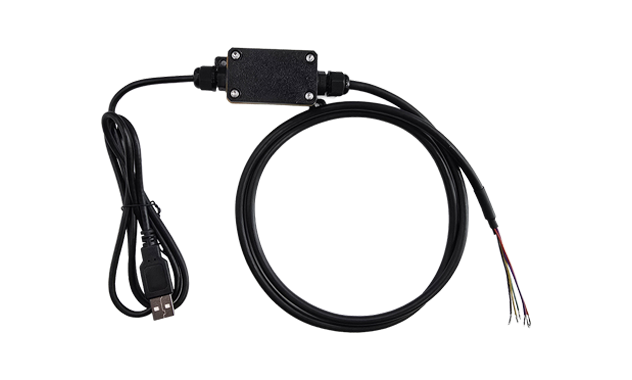
Adds CAN Bus capability to the BKT865-OTG dock through its USB-A OTG port. One adapter cable supports up to 2 CAN Bus channels, enabling hardware-level vehicle network access on a fixed installation without changing the dock. Ideal for retrofit deployments, pilot fleets, or vehicles that require CAN data only in specific configurations.
Key Specifications
Note: Connects to the BKT865-OTG cable's USB-A OTG port and presents a CAN Bus interface to the Android OS through the standard SocketCAN driver stack. CAN Bus termination and baud rate configuration are handled at the software level.
Explore EXT-USB-CAN-01 →
Wiring examples shown — not all configurations. Pin-out details, cable lengths, and cable part numbers may vary by production batch. For the full datasheet with dimensioned drawings and BKT865-OTG cable specifications, contact our engineering team.
Compatible Tablet Platforms
This fixed metal dock supports two tablet models with slightly different interface sets
The BKT865-OTG mounts to the MDT880 mechanical interface and provides VCC/IGN DC12–32V input, one RS232 channel, and one USB-A OTG port.
On the MDT865, this cradle additionally provides one camera input on the cradle, alongside DC12–36V input, one RS232 channel, and one USB-A OTG port.
For a complete list of docks and cradles compatible with the MDT880 and MDT865, refer to the docking station configuration matrix →